





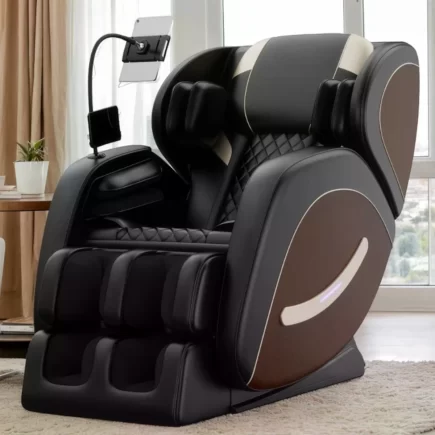




















The Massage Office Chair with Footrest is designed to deliver ergonomic comfort with advanced features like a reclining backrest, adjustable seat tilt, and built-in massage functionality. With clearly labeled parts and included hardware, the assembly process is simple and can be completed efficiently. This guide walks you through each step to ensure your chair is assembled safely and correctly.
Safety & Preparation
Before you begin, please read these important safety notes:
- Assemble the chair on a flat, clean, and soft surface
- Do not use power tools during assembly
- Keep children and pets away during assembly
- Ensure all parts are correctly aligned before tightening
- Handle electrical components carefully and avoid water exposure
Unboxing: Parts & Hardware Included
Before starting, make sure all parts and hardware are present.
Parts List
| Code | Part Name | Quantity |
| A | Backrest | 1 |
| B | Seat | 1 |
| C | Arm Rest | 2 |
| D | Seat mechanism | 1 |
| E | Gas Cylinder | 1 |
| F | Bellow (Gas Cylinder Cover) | 1 |
| G | Base | 1 |
| H | Castor Wheels | 5 |
| I | Backrest Cushion | 1 |
Hardware List
| Code | Hardware Name | Quantity |
| J | M6*20 Screws | 12 |
| K | M8*20 Screws | 3 |
| L | Power Adapter | 1 |
| M | Wired Remote Controller | 1 |
| O | Allen Key | 1 |
Step 1: Assemble the Base Structure
- Take Part E (the central pole) and insert it into the designated hole at the center of the Base (G).
- Once the pole is securely in place, attach the Castor wheels (H) into the holes located around the Base (G).
- Place the Bellow (F) onto the Gas Cylinder (E) as shown in the diagram, ensuring it covers the Gas Cylinder (E).
Step 2: Attach the Armrests to the Seat
- Take Part B (the Seat) and position it on a flat surface with the bottom side facing up.
- Align Part C (the Arm Rest) with the pre-drilled holes on the sides of the Seat (B) as shown in diagram.
- Insert M6*20 Screws (J) through the mounting holes of the Arm Rest (C) into the Seat (B).
- Use the Allen Key (O) to tighten the screws securely, ensuring the armrests are firmly attached to the seat.
Step 3: Install the Seat mechanism
- Align the Seat mechanism (D) with the pre-drilled hole in the center of the Seat (B) as shown in image.
- Insert M6*20 Screws (J) into the adjustment mechanism’s mounting holes.
- Tighten the screws using the Allen Key (O), securing the Seat Tilt Adjuster (D) to the Seat (B).
Step 4: Attach the Backrest (A) to the Seat (B)
- Place Seat (B) with the bottom side facing up. This requires two people to assemble.
- One person should hold the Seat (B) while the other person holds the Backrest (A).
- Position the Backrest (A) perpendicular to Seat (B), ensuring the pre-drilled holes on both parts align.
- Insert the M8*20 Screws (K) through the aligned holes of the Backrest (A) and Seat (B).
- Use the Allen Key (O) to tighten the screws and securely attach the Backrest (A) to the Seat (B).
Step 5: Attach the Seat to the Base
- Take Seat (B) with the Backrest (A) facing upward.
- Align the central opening of the Seat mechanism (D) with the top of the Gas Cylinder (E).
- Slowly lower the Seat (B) directly down onto the Gas Cylinder (E), ensuring that the central opening fits perfectly onto the cylinder.
- Apply gentle downward pressure to ensure the connection between the Seat (B) and Gas Cylinder (E) is secure.
Step 6: Connect the Power Adapter and Remote Controller
- Take the Power Adapter (L) and Remote Control (M), and securely connect them with the connection wire at the bottom of the seat, as shown in the image.
- Ensure the connection is secure so that the chair’s features can be controlled.
- Position the Backrest Cushion (I) on the Backrest (A), ensuring it aligns properly.
Your chair is now fully assembled and ready for use.
Troubleshooting Guide
| Issue | Possible Cause | Solution |
| Chair feels loose | Screws not fully tightened | Tighten all screws evenly. |
| Reclining mechanism doesn’t work | Loose power connections | Reconnect the Power Adapter (L) and Remote (M). |
| Uneven chair movement | Castor wheels not installed properly | Check all the castor wheels of the chair and ensure they are properly attached to the chair base. |
Care & Maintenance
- Clean the chair using a soft, dry cloth.
- Avoid using harsh chemicals on upholstery.
- Regularly check screws and tighten if needed.
- Keep electrical components away from moisture.
- Unplug the adapter when not in use.
With proper assembly and maintenance, your Massage Office Chair with Footrest (SKU: 921-759V80GY) will provide long-lasting comfort, support, and relaxation.
You can also download the HOMCOM Massage Office Chair with Footrest (SKU:921-759V80GY) assembly manual for your reference.
FAQs
A massage office chair promotes relaxation, improves posture, and reduces stress. It can help alleviate tension and improve blood circulation, making long hours of sitting more comfortable and less tiring.
Yes, it can help relieve lower back pain by targeting the lumbar area with soothing massage techniques. This can reduce muscle stiffness and enhance blood flow, providing much-needed relief for back discomfort.
To maintain your massage office chair, clean it regularly with a gentle cloth, lubricate moving parts, and check electrical components. Following the manufacturer’s care instructions ensures long-lasting functionality and comfort.