































The best overall computer desk for gaming is the HOMCOM 56″ Computer Desk with Power Outlets and LED Lights, since it pairs a built-in charging hub with adjustable RGB lighting and a monitor shelf sized for a 27″ screen. At 55.9″ W x 19.7″ D x 49.8″ H with a 176 lb overall weight capacity, it gives a full gaming setup room to breathe without needing extra desk accessories bolted on.
Best Computer Desks For Gaming In 2026
| No. | Desk | Best For |
| 1 | HOMCOM 56″ Computer Desk with Power Outlets and LED Lights | Best overall, built-in charging and RGB lighting. |
| 2 | HOMCOM 67″ CPU Desk with Monitor Stand | Best for large multi-device setups. |
| 3 | HOMCOM 63″ Computer Desk with Trapezoidal Frame | Best for dual-monitor width. |
| 4 | HOMCOM 47″ Computer Desk with 3 Drawers and Shelves | Best for gear storage. |
| 5 | HOMCOM Compact Computer Desk with 6-Tier Shelves | Best for open shelf organization. |
| 6 | Sturdy Computer Desk with FAS-Grade Oak | Best premium build in a small footprint. |
| 7 | HOMCOM Computer Desk for Small Spaces | Best budget pick for tight rooms. |
What Makes A Computer Desk Good For Gaming?
- Weight capacity: Multiple monitors, a tower, and peripherals add up fast, so a low weight limit becomes a real constraint.
- Cable and power management: Built-in outlets or a grommet keep a tangle of monitor, mouse, and headset cables off the floor.
- Desktop width: A single monitor needs less room than a dual or ultrawide setup, so surface length should match the actual gear.
- Monitor height: A riser or shelf that lifts the screen to eye level reduces neck strain during long sessions.
- CPU and accessory storage: Open shelves or a side compartment keep the tower ventilated instead of crammed under the desk.
What Desk Size Is Best For A Gaming Setup?
The right size depends on how many monitors are running and how much peripheral gear sits on the desktop. A single-monitor setup with a mouse and keyboard can work comfortably on a desk in the 45 to 50 inch range. Multi-monitor or streaming setups usually need 55 inches or more to avoid a cramped, overlapping layout.
When sizing a gaming desk, consider these factors:
- Monitor count: Each additional screen adds roughly 20 to 24 inches of desktop width.
- Peripheral footprint: A full-size keyboard, mouse pad, and headset stand all compete for the same surface area.
- Room clearance: A desk that is too deep can block drawers, closets, or walking space in a smaller room.
- Weight load: Towers, multiple monitors, and accessories can exceed 80 lbs combined, so check the desk’s rated capacity before adding gear.
If the setup is likely to grow, sizing up slightly now avoids replacing the desk later.
Top Computer Desks For Gaming
1. HOMCOM 56″ Computer Desk with Power Outlets and LED Lights – Best Overall
Most gaming desks leave power and lighting as an afterthought, forcing a separate power strip and lamp onto the desktop. This one builds both into the frame, along with a shelf for a larger monitor. It’s the desk on this list built most specifically around a gaming workflow.
Pros:
- The built-in charging station includes two power outlets, a USB port, and a USB-C port.
- RGB lighting is adjustable through an infrared remote.
- The monitor shelf raises a screen up to 27 inches to a more comfortable eye level.
- 176 lb overall weight capacity supports a tower, monitors, and accessories together.
- A pegboard with five hooks adds room for headsets or controllers.
Cons:
- Requires batteries for the remote.
- 39.4 inch working surface width is narrower than some multi-monitor desks on this list.
2. HOMCOM 67″ CPU Desk with Monitor Stand – Best For Large Multi-Device Setups
A tower running hot under a desk with nowhere to breathe is a common setup problem, and this desk solves it with a shelf built to hold a CPU on its side. It carries the highest weight rating in this roundup. The shelf also flips sides to fit either wall layout.
Pros:
- 165 lb weight capacity is the highest on this list.
- The monitor stand raises a screen by 3.9 inches, fitting monitors up to 15.6 inches.
- A reversible four-tier shelf can be assembled on either side.
- The 47.2 inch working surface leaves room for a keyboard and mouse pad side by side.
Cons:
- The monitor stand’s 15.6 inch screen limit will not fit most standalone gaming monitors.
- Open shelf design offers less enclosed storage than desks with drawers.
3. HOMCOM 63″ Computer Desk with Trapezoidal Frame – Best For Dual-Monitor Width
Dual and ultrawide setups need uninterrupted surface space more than storage, and this desk is built around that trade-off. Its trapezoidal steel base keeps a wide top from wobbling under a heavy monitor arm. There’s no storage built in, so it suits gamers who already have separate furniture for accessories.
Pros:
- 63 inch by 30.7 inch surface is the widest and deepest on this list.
- Dual trapezoidal base supports up to 154 lbs with minimal wobble.
- 28 inch legroom keeps long sessions comfortable.
- Water-resistant melamine surface handles spills near the keyboard.
Cons:
- No drawers or shelves, so storage requires separate furniture.
- 88 lb item weight makes it harder to move once assembled.
4. HOMCOM 47″ Computer Desk with 3 Drawers and Shelves – Best For Gear Storage
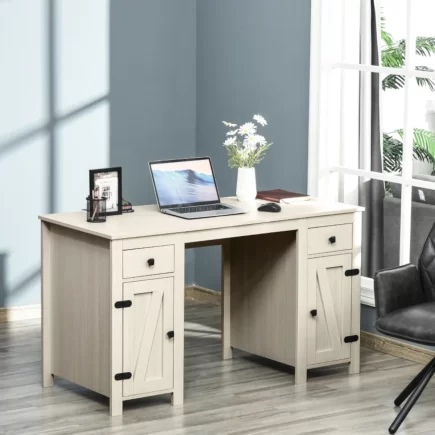
Controllers, headsets, and cables tend to pile up around a gaming desk, and this one is built to absorb that clutter. Three enclosed drawers plus three open shelves give it more total storage than any other desk here, in a footprint under four feet wide.
Pros:
- Three smooth-glide drawers give enclosed storage for controllers or accessories.
- Three open shelves add display or reach-in storage above the drawers.
- Drawers and shelves can be installed on either side to fit the room.
- 47.25 inch tabletop keeps a compact footprint for smaller gaming rooms.
Cons:
- 44 lb weight capacity is lower than the desks built specifically for gaming loads.
- No built-in cable management.
5. HOMCOM Compact Computer Desk with 6-Tier Shelves – Best For Open Shelf Organization
Some gaming setups work better with everything visible rather than tucked into drawers, and this desk is built entirely around that idea. Six open shelves run up both sides of the desktop. It suits a gamer who wants quick access to gear without opening anything.
Pros:
- Six shelves across both sides keep peripherals within reach.
- 47.25 inch length gives a full-size surface for a keyboard and monitor.
- Three height positions on the keyboard tray allow some ergonomic adjustment.
- Laminated finish wipes clean easily.
Cons:
- 44 lb desktop weight capacity is on the lower end for multi-monitor setups.
- Open shelving offers no enclosed storage for smaller accessories.
6. Sturdy Computer Desk with FAS-Grade Oak – Best Premium Build In A Small Footprint
Not every gaming desk is built from particleboard, and this one is the clearest example on this list. Solid FAS-grade oak construction gives it more durability than the others here, at a higher price and narrower frame. It suits a gamer prioritizing build quality over desktop size.
Pros:
- Solid North American FAS-grade oak construction outlasts particleboard alternatives.
- Anti-scratch finish holds up against daily mouse movement.
- Rounded corners reduce injury risk in a small or shared room.
- 32 lb assembled weight makes it easy to reposition.
Cons:
- 31.5 inch width is the narrowest on this list.
- Highest priced option here, positioned as premium rather than budget.
7. HOMCOM Computer Desk for Small Spaces – Best Budget Pick For Tight Rooms
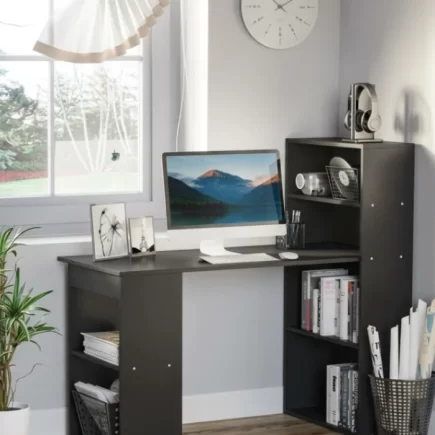
A dorm room or small bedroom rarely has space for a 55 inch gaming desk, and this pick exists for that situation. It keeps the footprint under 32 inches wide while still holding 110 lbs on the desktop. It’s a starting point rather than a multi-monitor solution.
Pros:
- 31.5 inch footprint fits dorms, small bedrooms, or tight office corners.
- One drawer and two open shelves cover basic storage needs.
- 110 lb desktop weight capacity is higher than its compact size suggests.
- Lowest cost entry point on this list.
Cons:
- 39.25 inch height and shallow depth limit it to a single small monitor.
- No monitor stand or built-in cable management.
Common Mistakes People Make When Buying A Computer Desk For Gaming
- Choosing a desk based on looks alone without checking its rated weight capacity against actual gear.
- Underestimating desktop width needed for a dual-monitor or streaming setup.
- Skipping cable management features, then dealing with a tangled mess afterward.
- Picking a tall desk without checking that a monitor riser or stand fits the intended screen size.
- Ignoring room depth and ending up with a desk that blocks doors or drawers once assembled.
Choosing the right computer desk for gaming comes down to matching size and weight capacity to the actual setup rather than the features that look most appealing in photos. Checking these specs against the gear that will sit on top leads to a desk that lasts through years of upgrades.
FAQs
A desk that is at least 47 to 55 inches wide comfortably fits two standard monitors while leaving space for a keyboard and accessories. Larger ultrawide displays or extra equipment may require a desk over 60 inches wide.
Standing desks allow you to alternate between sitting and standing throughout the day, which can improve comfort during long work sessions. They’re especially useful for home offices where flexibility and ergonomics are priorities.
Weight capacity varies by design and materials, but most standard computer desks support between 100 and 300 pounds. Always check the manufacturer’s specifications if you plan to use multiple monitors or heavy equipment.
Solid wood and steel-framed desks generally offer the greatest durability and stability. Engineered wood with a quality finish is also a reliable option for everyday home or office use when properly maintained.