








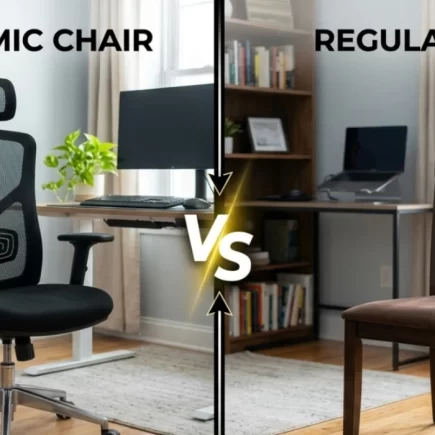




















Most people don’t think about their chair until their lower back starts complaining around 3 PM. A regular chair is generally designed to provide a place to sit, while an ergonomic chair is designed to support your body through longer periods of sitting.
The difference becomes clearer when you compare the details. Lumbar support, seat depth, armrests, reclining, materials, adjustability and overall fit can all affect how a chair feels throughout the day. Here’s a section-by-section comparison to help you understand what actually changes between an ergonomic chair and a regular chair.
Lumbar Support and Backrest Design
Your lower spine has a natural inward curve called lordosis. A regular chair often has a flat or lightly curved backrest with limited adjustment, so the amount of support you receive depends largely on the chair’s fixed shape.
An ergonomic chair is designed to provide more targeted lower-back support. Many models include a contoured lumbar area that can be adjusted in height or depth, allowing you to position the support closer to your natural spinal curve.
| Feature | Regular Chair | Ergonomic Chair |
| Lumbar shape | Flat or fixed curve | Contoured and often adjustable. |
| Backrest height | Usually fixed | Often adjustable. |
| Lumbar position | Limited control | Can be positioned to suit the user. |
| Back support | General support | More targeted support. |
Tip: Position lumbar support around the natural curve of your lower back rather than too high against your mid-back.
Seat Construction, Depth and Edge Shape
Seat design is another major difference between regular and ergonomic chairs. A regular chair generally has a fixed seat depth, which may not suit every body type. If the seat is too deep, you may need to move forward to avoid pressure behind your knees.
Ergonomic chairs often provide adjustable seat depth or a more carefully shaped seat pan. Some also feature a waterfall-style front edge that slopes downward to reduce pressure around the back of the knees.
| Feature | Regular Chair | Ergonomic Chair |
| Seat depth | Usually fixed | Often adjustable. |
| Seat shape | Basic, flat or lightly contoured | Contoured for body support. |
| Front edge | Square or rounded | Often waterfall-shaped. |
| Fit | One general size | More adaptable to different users. |
Tip: Leave a small gap between the front edge of the seat and the back of your knees. This helps you sit back against the backrest without putting unnecessary pressure on your legs.
Armrest Support
Regular chairs may have no armrests or fixed armrests that offer little flexibility. Their height and position may work for some users but can be uncomfortable when the desk, keyboard or mouse sits at a different height.
Ergonomic chairs commonly offer adjustable armrests. Depending on the design, they may move up and down, side to side, forward and backward, or pivot to support different working positions.
- 1D: Height adjustment.
- 2D: Height and width adjustment.
- 3D: Adds forward and backward movement.
- 4D: Adds pivot or angle adjustment.
| Feature | Regular Chair | Ergonomic Chair |
| Armrests | Optional or fixed | Commonly adjustable. |
| Height | Usually fixed | Adjustable on many models. |
| Positioning | Limited | Multiple adjustment options. |
| Desk compatibility | Can be restrictive | Easier to position correctly. |
Tip: Your armrests should allow your elbows to remain comfortably supported while your shoulders stay relaxed.
Recline, Tilt and Movement Mechanisms
A regular chair may have a fixed backrest with little or no movement. This can work well for dining, occasional seating or shorter periods of desk use, but it gives you fewer options to change position.
An ergonomic chair usually provides a tilt or recline mechanism. Some models allow the backrest to move independently, while others coordinate the movement of the seat and backrest. This gives you more freedom to change position during longer sitting sessions.
| Mechanism | Regular Chair | Ergonomic Chair |
| Fixed position | Common | Available on some models. |
| Tilt | Limited or unavailable | Common |
| Recline | Rare | Common on many models. |
| Tilt lock | Usually unavailable | Often included |
| Movement | Minimal | Designed for position changes. |
Tip: Don’t try to maintain one perfectly fixed posture all day. Changing position regularly can make extended sitting more comfortable.
Headrest and Upper-Body Support
A headrest is uncommon on basic regular chairs, particularly dining and simple task chairs. When present, it is often fixed and offers limited adjustment.
Ergonomic chairs may include adjustable headrests that support the head and neck when you recline. Height and angle adjustment can make a difference because people have different body proportions.
| Feature | Regular Chair | Ergonomic Chair |
| Headrest | Usually absent | Available on many models. |
| Height adjustment | Rare | Common on adjustable models. |
| Angle adjustment | Rare | Available on some models. |
| Best use | Upright, shorter sitting | Reclining, reading or longer sessions. |
Tip: A headrest is most useful if you frequently recline, read or take long calls. If you mainly sit upright, it may be less important than good lumbar and seat support.
Materials and Breathability: Mesh vs Foam vs Leather
The materials used in a chair can affect how it feels after several hours. Regular chairs often rely on basic fabric, foam, wood or upholstered surfaces, depending on their purpose.
Ergonomic chairs are available in many of the same materials, but their construction often combines materials to balance cushioning, support and airflow. Mesh backs, for example, allow more air to circulate than fully padded backrests.
| Material | Regular Chair Use | Ergonomic Chair Use |
| Mesh | Less common | Popular for breathable backrests. |
| Fabric | Common | Common |
| Foam | Basic cushioning | Contoured or higher-support cushioning. |
| PU leather | Common on some office chairs | Available on many ergonomic models. |
| Genuine leather | Used on premium seating | Available on premium ergonomic chairs. |
Tip: If your workspace gets warm, a breathable mesh back can help reduce heat buildup during longer sitting sessions.
Build Quality: Base, Cylinder and Casters
The construction of the chair affects stability, movement and long-term usability. Regular chairs can use simple fixed legs or basic chair bases because they are often intended for straightforward seating.
Ergonomic office chairs typically use a five-star base, casters and a gas-lift cylinder. Better-built models may use reinforced bases, smoother casters and stronger components designed for frequent adjustment and daily use.
| Component | Regular Chair | Ergonomic Chair |
| Base | Legs or basic base | Five-star office base. |
| Height mechanism | Usually absent | Gas-lift cylinder. |
| Casters | May be absent or basic | Common on office models. |
| Adjustability | Limited | Designed for frequent adjustment. |
| Stability | Depends on design | Wide five-star base on many models. |
Tip: If an office chair gradually sinks while you’re sitting, the gas-lift cylinder may need replacement rather than the entire chair.
Weight Capacity and Body-Size Fit
Weight capacity is important, but it should not be the only measurement you consider. A chair can support a particular weight while still being too narrow, too deep or too short for the person using it.
Regular chairs generally come in a standard size with limited adjustment. Ergonomic chairs provide more opportunities to match seat height, width, depth and backrest position to different body types.
| User Consideration | Regular Chair | Ergonomic Chair |
| Seat width | Usually fixed | More size options available. |
| Seat height | Fixed or limited | Adjustable |
| Seat depth | Usually fixed | Often adjustable |
| Backrest fit | One general shape | More adaptable |
| Weight capacity | Varies by model | Available across wider ranges. |
Tip: Your feet should rest comfortably on the floor, with your thighs supported without excessive pressure behind your knees.
Durability and Expected Lifespan
Durability depends on materials, construction, frequency of use and maintenance rather than whether a chair is simply labelled regular or ergonomic.
A basic regular chair may have fewer moving components, while an ergonomic chair has more mechanisms that can eventually require maintenance. However, a well-built ergonomic chair can be designed for frequent daily use and may provide longer-lasting support when properly maintained.
| Factor | Regular Chair | Ergonomic Chair |
| Construction | Often simpler | More complex. |
| Moving parts | Few or none | Multiple adjustment mechanisms. |
| Maintenance | Generally simple | May require occasional adjustment or replacement parts. |
| Daily office use | Depends on model | Designed for frequent use on many models. |
| Durability | Varies widely | Varies widely by construction. |
The important point is not simply choosing the chair with the longest claimed lifespan. Look at the quality of the frame, base, upholstery, adjustment mechanisms and warranty before making a decision.
Health Impact: Posture, Comfort and Movement
Neither an ergonomic chair nor a regular chair automatically prevents back pain. The way you sit, how long you remain seated and how often you move also matter.
The main difference is that an ergonomic chair gives you more tools to create a comfortable working position. Adjustable lumbar support can help support the lower back, armrests can provide support for the arms, and seat adjustments can help accommodate different body proportions.
Three areas where the designs can differ include:
- Pelvic position: A properly fitted seat can make it easier to maintain a comfortable sitting position.
- Leg pressure: An appropriately shaped seat edge can reduce pressure behind the knees.
- Shoulder support: Properly positioned armrests can support the arms while keeping the shoulders relaxed.
A regular chair can still be comfortable for shorter periods, particularly when its dimensions suit you. The issue is that it generally gives you fewer ways to change the setup when your body or workspace requires a different position.
Tip: Regardless of your chair type, take regular standing or walking breaks during long periods of sitting.
Suitability by Daily Sitting Hours
The number of hours you spend sitting is one of the simplest ways to decide whether the additional adjustability of an ergonomic chair is worthwhile.
| Daily Sitting | Regular Chair | Ergonomic Chair |
| Under 2 hours | Usually sufficient for basic seating. | Useful but not essential. |
| 2 to 4 hours | May work if well-fitted. | Height and lumbar adjustment are helpful. |
| 4 to 6 hours | Fit becomes increasingly important. | Adjustable lumbar and tilt are beneficial. |
| 6 to 8 hours | Limited adjustability may become noticeable. | More comprehensive adjustments are recommended. |
| 8+ hours | Choose carefully for fit and support. | Prioritise adjustability, support and durability. |
Ergonomic Chair vs Regular Chair: Which Should You Choose?
A regular chair can be the practical choice when you need simple seating for meals, occasional desk work, meetings or shorter periods of use. Its straightforward design may be all you need when long-duration support is not a priority.
An ergonomic chair makes more sense when you spend several hours at a desk and need to adjust the chair to your body and workspace. Features such as lumbar adjustment, seat-depth control, adjustable armrests and reclining can make it easier to create a comfortable setup.
The best choice ultimately depends on how long you sit, how your body fits the chair and how much adjustability you need. When comparing ergonomic chair and regular chair options from Aosom, focus on the features that match your daily routine rather than assuming that more adjustments automatically mean a better chair.
FAQs
An ergonomic chair may help reduce some of the strain associated with poor sitting habits, particularly when the upper body is properly supported. However, neck discomfort can have many causes, so a chair should not be considered a treatment.
Yes, ergonomic chairs can suit students who spend long periods reading, writing or using a computer. Their adjustable design can make it easier to create a comfortable study setup. Taking regular breaks is still important during extended study sessions.
An ergonomic chair can work well for gaming because players may remain seated for extended sessions. A comfortable design can support different activities, from keyboard use to watching videos. The ideal chair still depends on your setup and personal preferences.