







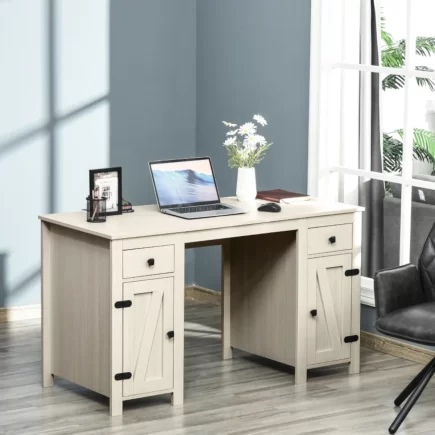






















Finding the right place for a computer desk can be trickier than it first seems. A poor position can lead to screen glare, limited movement, messy cables, or a workspace that makes the room feel cramped. Whether you are arranging a home office, bedroom, living room, or small apartment, the right placement can make your workspace more comfortable and practical.
Best Placement & General Considerations
Where Is the Best Place to Put a Computer Desk?
The ideal desk spot has three qualities: indirect natural light, a wall or corner nearby for cable routing, and enough floor clearance to push a chair back fully. A corner or a wall perpendicular to a window typically checks all three boxes at once, which is why it comes up as the default recommendation across most room types and layouts.
Rooms without a dedicated office still have a best spot, usually the quietest wall away from foot traffic and shared electrical outlets. In an open-plan apartment, that often means a wall segment between two doorways rather than the center of the room.
What the best spot usually has in common:
- A wall or corner within reach for cable routing.
- A window nearby, positioned to the side rather than in front.
- At least 30 inches of open floor behind the chair.
- Distance from vents, radiators, and shared foot traffic.
How to Choose the Right Spot for Your Computer Desk?
Start by measuring the desk footprint plus 30 to 36 inches of clearance behind it, since this is the minimum space needed to push a chair back comfortably. Mark this area with tape on the floor before moving furniture, since a spot that looks open by eye can turn out too tight once the clearance is added.
Next, check for a nearby power outlet. Extension cords running across open floor are both a trip hazard and a common source of clutter, so a spot within reach of an outlet usually beats one that is otherwise more spacious.
Light direction matters just as much as floor space. A spot that looks open but faces a window directly will cause glare on the screen for most of the day, even if the room feels bright at first glance.
1. Computer Desk Placement by Room
Where to Put a Computer Desk in a Home Office
A home office desk works best facing the door, or angled so the door stays visible from a seated position. This reduces the startle effect of someone entering unannounced and tends to read better on video calls, where a visible door signals a closed, professional space.
If the room has a closet, keep the desk clear of the door swing so storage stays fully accessible. Home offices doubling as guest rooms benefit from a layout that also leaves a clear path to the bed or fold-out furniture.
Home office placement checklist:
- Desk faces or partially faces the door.
- Window light hits the desk from the side, not the front.
- Closet or storage doors can open fully.
- Outlet access within reach for a monitor and peripherals.
Where to Put a Computer Desk in a Bedroom
A bedroom desk should sit away from the bed’s direct sightline, keeping the sleep space and the work space visually separate. A corner near a window uses otherwise dead space well and keeps cables clear of the bed frame and nightstand outlets.
Avoid the foot of the bed, since it compresses the walking path used every day and makes the room feel smaller than it is. In smaller bedrooms, a narrow desk against the opposite wall usually works better than a corner desk.
Where to Put a Computer Desk in a Living Room
A living room desk fits best along a side wall, away from the main seating sightline to the TV. This keeps the desk from competing visually with the room’s primary function as a shared, relaxed space.
A console-style desk against a wall also doubles as a room divider in open-plan layouts, separating a living area from a dining or entry space without adding a permanent wall.
Living room placement options:
- Side wall, away from the TV sightline.
- Behind a sofa, used as a room divider.
- In an alcove or bay window nook, if available.
- Against a shared wall with a bookshelf.
Where to Put a Computer Desk in a Small Apartment
Corners and alcoves are the highest-value real estate in a small apartment, since they use space that most furniture layouts leave empty. A narrow desk under 24 inches deep fits most alcoves without blocking the room’s overall flow.
A desk that shares a wall with a bookshelf, or a wall-mounted floating desk, keeps a small footprint from feeling cramped. This matters most in studio layouts where every piece of furniture does double duty.
Where to Put a Computer Desk in a Shared Space
In a shared room, place the desk against the wall farthest from the other person’s main activity zone, such as a bed or a sitting area. This limits visual and sound overlap between work and rest throughout the day.
A room divider, bookshelf, or curtain between the two zones reduces distraction further. Assigning separate outlets to each zone also prevents cable overlap in tighter layouts.
2. Window, Light & Screen Position
Should You Put a Computer Desk Near a Window?
Yes, a desk near a window is ideal for natural light, but only when positioned perpendicular to the window rather than facing it directly. Direct-facing placement causes glare, while a perpendicular angle lights the desk surface evenly across the day.
Where to Put a Computer Desk for Better Natural Light
The best light comes from a desk placed beside a window, with light hitting the desk from the side rather than the front or back. This angle illuminates the keyboard and desk surface without casting shadows on the screen.
North-facing windows give the most consistent light throughout the day, with less harsh direct sun than south-facing rooms. East and west-facing rooms swing more, with strong morning or afternoon sun at peak hours.
| Window Orientation | Light Quality | Desk Recommendation |
| North-facing | Soft, consistent all day. | Safe for direct desk placement nearby. |
| South-facing | Bright, strong midday sun. | Use blinds or angle desk away from peak sun. |
| East-facing | Strong morning light. | Position desk to avoid morning glare. |
| West-facing | Strong afternoon light. | Position desk to avoid afternoon glare. |
Where to Put a Computer Desk to Reduce Screen Glare
Position the monitor perpendicular to the nearest window and at least 3 feet from direct sunlight exposure. A screen facing a window head-on will wash out for several hours a day, which strains the eyes over repeated use.
A screen with a window directly behind it creates the opposite problem, a harsh silhouette effect that shows up clearly on video calls.
Quick glare-reduction fixes:
- Turn the monitor perpendicular to the window.
- Add blinds or sheer curtains to soften direct sun.
- Choose a matte screen finish over glossy.
- Test the setup at midday, when glare typically peaks.
How far should a computer desk be from a window?
A desk should sit at least 2 to 3 feet from a window to avoid temperature swings and direct glare, while staying close enough to still benefit from natural light. This distance also protects electronics from condensation near single-pane windows.
Should a Computer Desk Face the Wall or the Room?
A desk facing the wall maximizes focus and minimizes visual distraction, making it the better choice for long stretches of deep work. A desk facing the room suits people who need a sightline to the door, such as parents monitoring children or frequent video call hosts who want the room visible on camera.
3. Space, Accessibility & Organization
Where to Put a Computer Desk in a Corner
A corner placement works best with an L-shaped or corner-specific desk that uses the full depth of the space without wasting the center of the room. This layout suits small bedrooms and studio apartments especially well, where every unused corner otherwise goes to waste.
Corner desks also tend to reduce glare naturally, since the two walls typically block direct light from more than one direction at once.
Where to Put a Computer Desk Without Blocking Walkways
Keep at least 30 inches clear on any side of the desk that intersects a walking path. Measuring the room’s traffic flow before placing the desk, rather than after, prevents the common mistake of boxing in a doorway or hallway.
Walkway clearance checklist:
- At least 30 inches of clear floor along any daily path.
- No desk edge within swing range of a door.
- The chair fully pulled out without touching other furniture.
- Clear sightline to the room’s main exit from the desk.
Where to Put a Computer Desk for Better Cable Management
Position the desk near an existing outlet or a wall with a cable channel to avoid running cords across the open floor. A desk with a built-in cable tray or grommet holes solves most of this problem without added hardware or extra effort.
Finding the Right Desk for Your Space
Once the spot is chosen, the desk type should match the constraints of that spot. A compact desk suits an alcove, a corner needs a desk built for that angle, and a home office running dual monitors needs more surface area than a bedroom nook allows.
| Desk Type | Best For | Typical Depth |
| Compact desk | Small apartments and alcoves | Under 24 inches |
| Corner Desk | Bedroom or living room corners | 40 to 48 inches per side |
| L-shaped Desk | Home offices needing dual monitor space | 48 to 60 inches per side |
| Desk with storage | Shared spaces and small apartments | 24 to 30 inches |
| Standing desk | Home offices with limited floor space for a chair | 24 to 30 inches |
Common Computer Desk Placement Mistakes
The most common mistake is facing a desk directly into a window, which causes glare and eye strain within the first hour of regular use. A close second is placing the desk in a walkway, which turns every chair pushback into an obstacle for anyone passing through.
Cable neglect is another frequent issue, with cords taped across the floor instead of routed near an outlet. This looks cluttered and creates an ongoing tripping hazard.
| Mistake | Why It’s a Problem | Quick Fix |
| Placing desk in a walkway | Blocks foot traffic, chair pushback. | Move desk against a side wall instead. |
| Ignoring outlet location | Leads to loose cords across the floor. | Choose a wall within reach of an outlet. |
| Setting up near a vent | Causes temperature discomfort, dust buildup. | Shift desk at least 2 feet from vents. |
| Undersized clearance | Chair can’t push back fully. | Leave 30 inches minimum behind the chair. |
Choosing the right spot for your computer desk can make a noticeable difference to how comfortable and practical your workspace feels. Whether you are placing an Aosom desk in a quiet bedroom corner or setting up a dedicated home office, think about lighting, movement, power access and the space around it.
Taking a little time to choose the right position with the right computer desk can help create a workspace that stays comfortable, organised and easy to use.
FAQs
For two monitors, look for enough width to keep both screens comfortably positioned without crowding the keyboard and mouse. A wider surface also leaves room for speakers, notebooks and other accessories. Measure your equipment before choosing the desk.
It is better to keep a computer desk away from radiators and other heat sources. Continuous heat can make the workspace uncomfortable and may affect electronic equipment over time. Leave sufficient space around the heat source so warm air can circulate properly.
A single-user desk does not need to be particularly large if you only use one monitor and basic accessories. Around 40–48 inches of width can provide useful working space without taking over the room. Your equipment should determine the final size.